
Dance Master Pro offers payments and invoicing software for dance schools to manage fees, invoices and receipts efficiently. Automate payments, reduce errors and keep full control of your financial operations.
Generate invoices with a single click for your dance school
With a single click you can generate PDF invoices customised with your logo, colours and numbering scheme. The system allows you to:
Track payment status, generate automatic reminders and send summaries of due fees. Add detailed descriptions, taxes, discounts and payment terms.
Save invoices automatically to your cloud repository (Google Drive, OneDrive, Dropbox) and email them to your members.
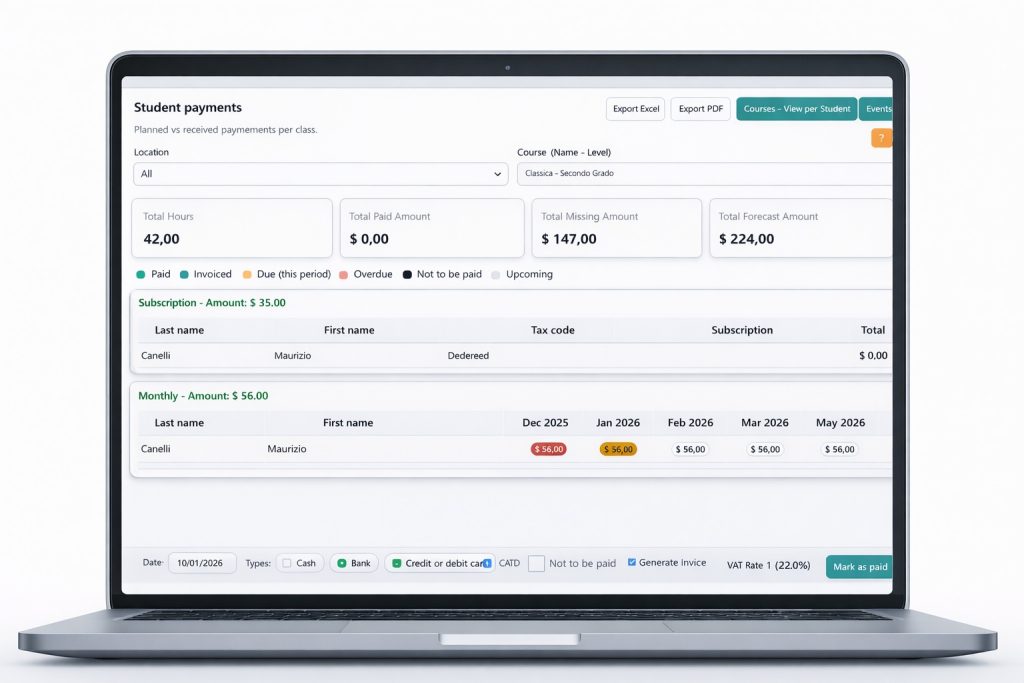

Step One: Set Up Your Payment Options
Easily configure a variety of multi-currency payment methods and select from multiple options such as credit cards, bank transfers, or popular e-wallets to suit your needs seamlessly and conveniently.

Step Two: Customize Your Invoices
Create and design fully customized invoices that prominently feature your unique branding elements, including logos, color schemes, and fonts, to reflect the distinct identity of your business. Incorporate comprehensive and detailed breakdowns of all charges, clearly itemizing each service or product, to ensure transparency and clarity. This approach will help your business maintain a highly professional, polished, and trustworthy appearance, fostering stronger client relationships and enhancing your overall brand image.

Step Three: Manage Payments Efficiently
Easily track all your payment statuses in real-time, set up automated recurring charges for consistent billing, and send timely reminders to your clients without any hassle. Generate detailed PDF invoices that include or exclude the TAX rate based on your preferences, and securely store all documents in your cloud repository for easy access and management.
Four Payment Perspectives
You have four view to get your students payments list based on your needs