
Families do not open emails. They open their phone. With the Dance Master Pro app your school lives there: timetable, fees due, certificates about to expire, bookings and alerts, with your logo and your colours.
Your school on parents’ phones
It is active the day you order it: no Apple or Google developer account to open, no app review to wait for.
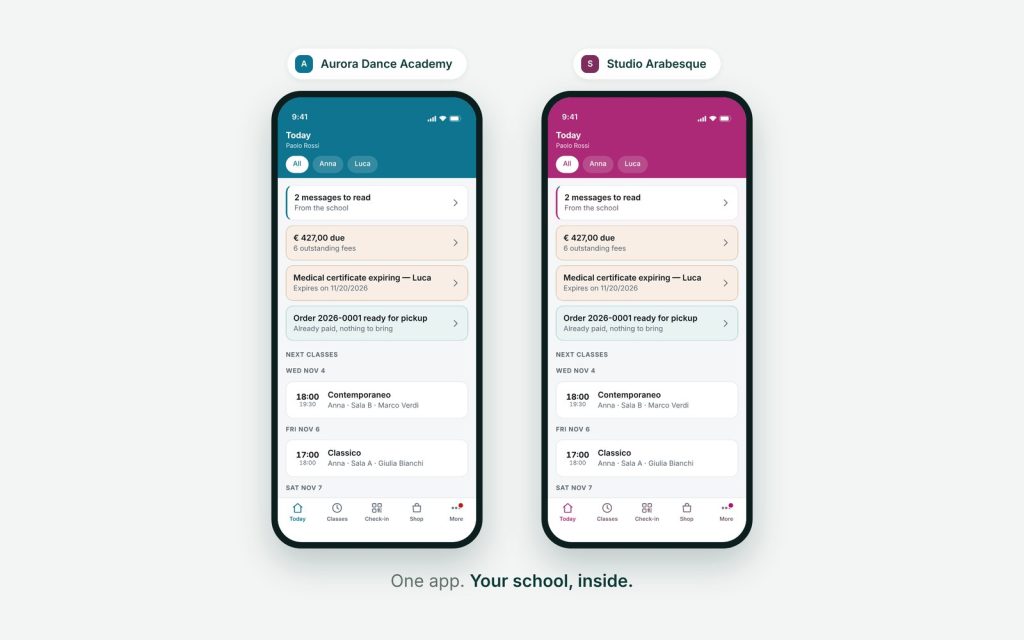

It opens on your brand
On launch a parent sees your school’s logo on your school’s colour, not ours. Name, logo and colours come from your own settings: change them in the back office and the app changes, with nothing to download.

They sign in as they already do
Same academy code, same email, same password. No new account to create, no invitations to send, no lists for the office to rebuild: anyone already using the family portal is in on the first try.

Today, straight away
The first screen answers the question parents actually have: what is happening today. Their children’s lessons, the time, the studio. Below it, what needs doing: a fee overdue, a certificate expiring, a form to fill in.

Notifications that arrive
Lesson cancelled, fee due, certificate to renew: the message reaches the phone, not an inbox nobody opens. That is the difference between a notice sent and a notice read.

Payments, certificates, enrolments
Everything families did from the portal they do from the app: see what they owe, photograph and upload the medical certificate, enrol in the season’s courses, book a catch-up lesson.

Several children, even in two schools
A parent with two children sees them together. And if those children attend two different schools that both use Dance Master Pro, the parent keeps both inside the same app and switches between them.
App for families: frequently asked questions
Will the app carry our school’s name and icon?
The icon on the home screen is Dance Master Pro’s, and families download it by searching for “Dance Master Pro”. That is why you do not have to open or pay for an Apple developer account ($99 a year) and a Google one ($25), and why you do not wait two weeks for store review. Everything inside the app is yours: the opening screen with your logo and colours, your name, your courses. If you need the icon to carry your own school’s name, talk to us: that is a separate product.
How does the app know which school we are?
From the code families already use to sign in to the portal, the one printed on their receipt. They type it once, at first launch, and from then on the app opens straight into your school.
Do families have to learn anything new?
No. The credentials are the portal’s and the screens show the same things. Anyone who does not want the app keeps using the portal on a computer, exactly as now.
Does it work on iPhone and Android?
Yes, both, from the same app. Notifications work on both.