
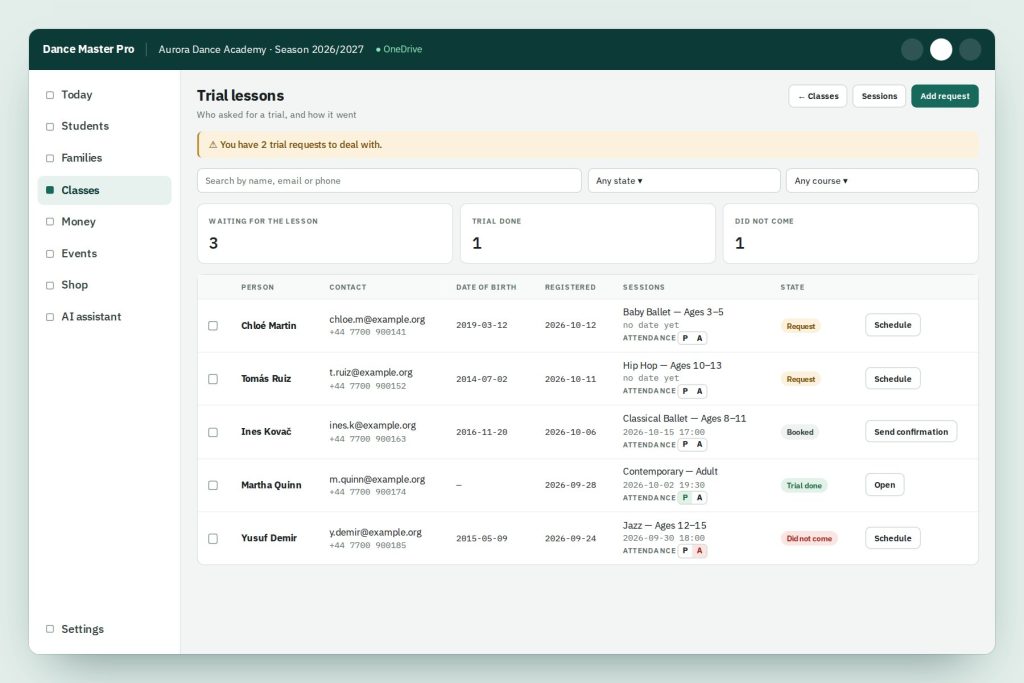
Trial lesson management for dance schools in one list: requests arrive from your website, you give each one a date, the family gets a confirmation and you record whether they came. Every new student starts here, and none gets lost in an inbox.
From the first request to the first lesson
Who asked for a trial, when it is booked and how it went: all in one place, with the numbers at the top.

Request form on your website
Visitors ask for a trial from your public course showcase: pupil name, date of birth, contact details and the course, grouped by location.

You are told straight away
Each new request reaches the school by email and appears in the list with a reminder of how many still need handling.

Give it a date
Assign the trial to a session of the chosen course. Requests taken by phone or at the desk can be added by hand.

Confirmation and reminder
Send the family a confirmation with date, time and your own note, and let the automatic reminder do the rest before the lesson.

Present or absent
Mark attendance with one tap. The counters show at a glance who is waiting, who has done the trial and who did not come.

Search and filter
Find a request by name, email or phone, and filter by status or course to plan follow-ups.
Trial lessons: frequently asked questions
Where do families request a trial?
From the public course showcase, which you can link or embed on your website. The form explains that name and date of birth are the pupil’s, while email and phone are for contact.
Can I add requests that come by phone?
Yes. “Add request” creates the same record as the online form, so every trial is in the same list.
Does the family receive a confirmation?
Yes. From the request you send a confirmation email with the date and an optional note, and a reminder goes out before the lesson.
Can I see how many trials turn into lessons attended?
Yes. The counters at the top show requests waiting, trials done and no-shows, and you can filter the list by course.